How Does Ink Expire?
Many people struggle with their ink cartridges drying out or fading before they even get a chance to use them. It’s frustrating to invest in ink only to find it’s no longer good when you need it most. You’re not alone—understanding how ink expires can help you save money and avoid printing headaches.
Ink expires when chemical breakdowns cause fading, color separation, and thickening due to evaporation or oxidation. Physical changes like clumping, sediment, and dried surfaces also signal deterioration.
Environmental factors such as exposure to air, light, and heat speed up this process.
Using expired ink can damage your printer and produce poor-quality prints. To keep your ink fresh longer, it’s helpful to understand how storage and handling influence its lifespan and what signs to watch for.
Key Takeaways
- Ink chemicals break down over time, which can cause the color to fade, discolor, and the overall print quality to decline.
- When ink is exposed to air, light, and UV rays, it speeds up the process of oxidation and pigment breakdown.
- As the carrier fluids evaporate, the ink becomes thicker. This can lead to clumping, clogging nozzles, and flow problems.
- If ink is stored improperly or gets exposed to moisture, microbes and mold can start to grow.
- Old or deteriorated ink may cause print defects, damage printer parts, and even pose safety risks.
How Does Ink Degrade Over Time?
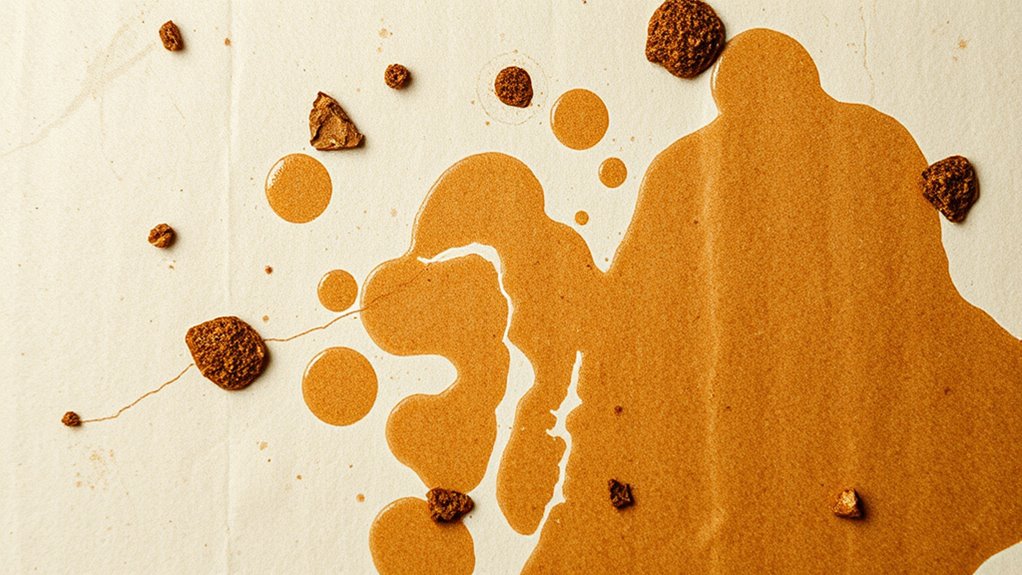
Ink degrades over time because its chemical components gradually break down. The stabilizers, dyes, and pigments in the ink undergo chemical changes, which can cause fading and color separation.
Ink naturally breaks down, causing fading and color separation over time.
Exposure to light, air, and temperature fluctuations speeds up this process by accelerating oxidation. As the ink oxidizes, its chemical compounds weaken, making the ink less stable and effective.
Additionally, as the carrier fluids evaporate, the ink’s viscosity increases, making it thicker and harder to flow. This change can impair print quality and even cause clogs.
Over time, these chemical changes reduce the ink’s vibrancy and consistency. Understanding these processes helps explain why ink’s performance deteriorates as it ages.
What Chemical Changes Happen as Ink Gets Old?
As ink ages, the stabilizers and preservatives break down, making the chemical makeup unstable. This can cause the pigments to settle or clump together.
At the same time, the carrier fluid evaporates and thickens, which affects how the ink flows. These chemical changes can lead to faded colors and inconsistent printing.
You might also notice nozzle problems as a result of these changes. Overall, old ink just doesn’t perform as well as fresh ink.
Pigment Sedimentation and Clumping
When ink ages, chemical stabilizers that keep pigment particles evenly dispersed start to break down. This leads to sedimentation and clumping.
As stabilizers weaken, pigment particles no longer stay suspended. This causes pigment to settle at the bottom of cartridges or bottles, forming a concentrated layer that can block ink flow.
Reduced ink stability also results in pigment clumping, where particles stick together and form clusters. These clumps can clog printer nozzles or printhead channels.
Blocked nozzles can cause uneven printing and even damage your printer. The breakdown of surfactants and dispersants speeds up this process, making it harder for the ink to stay uniform.
Carrier Fluid Evaporation and Thickening
Over time, the volatile carrier fluid in ink gradually evaporates, causing the remaining mixture to thicken and become more viscous. As evaporation continues, less moisture remains, making the ink more concentrated.
This thickening hampers proper flow through printer nozzles and can lead to clogging. The loss of carrier fluid also reduces the ink’s fluidity, increasing the risk of print quality issues.
Furthermore, chemical breakdowns of stabilizers and preservatives accelerate with age, further altering the ink’s physical properties. When moisture content drops considerably, a hardened skin may form at the nozzle tip, blocking ink flow altogether.
Stabilizer Breakdown and Chemical Degradation
Chemical stabilizers in ink are intentionally used to keep pigments and dyes evenly suspended. But as the ink ages, these stabilizers start to break down.
This breakdown triggers chemical reactions like oxidation, which can change the ink’s color and make it less consistent. As stabilizers deteriorate, the pH level shifts, increasing the chances of microbial growth and contamination.
When the chemical balance is disrupted, components can separate, leading to sedimentation and clogging in printer nozzles. Without effective stabilizers, volatile carriers evaporate faster, thickening the ink and causing flow problems.
How Air and Light Speed Up Ink Deterioration?
Air and light actively speed up ink deterioration by triggering chemical reactions that break down its components. When exposed to air, the volatile carriers in ink evaporate, making the ink thicker and increasing the risk of nozzle or filter clogs.
Ultraviolet light from sunlight speeds up the breakdown of dyes and pigments, causing fading and unstable colors. Oxygen reacts with ink molecules, leading to oxidation that changes the ink’s color and reduces its stability.
Continuous light exposure also damages stabilizers in the ink, which can lead to microbial growth and further deterioration. Both air and light promote chemical reactions that break down the ink’s molecular structure.
This process shows how environmental factors play a crucial role in the lifespan and effectiveness of ink.
How Can You Tell If Ink Has Gone Bad?
You can usually tell if ink has gone bad by inspecting its appearance and smell. Fading or discoloration is a clear sign the ink has expired, especially if the color no longer matches what it should be.
Pay attention to the consistency; if the ink appears thick, grainy, or separated, it’s a sign it’s degraded and no longer usable. Unusual odors, like a foul or chemical smell, indicate microbial growth or chemical breakdown.
Plus, visible mold, particles, or sediment suggest the ink has gone bad. Inconsistent or streaky print results are common signs that the ink has lost its proper chemical stability. Recognizing these signs helps prevent poor print quality and potential damage to your printer.
Physical Signs That Ink Has Expired or Dried Out?
You might notice your ink has expired if the color looks faded or uneven, which can indicate chemical changes.
A thick, grainy, or clumpy texture is another sign that it’s dried out or broken down.
Plus, a foul smell could mean microbial growth or chemical breakdown has occurred.
Color Fading or Discoloration
When ink has expired or dried out, it often shows up through noticeable color fading or discoloration. You’ll see the vibrant hues dulling, with colors losing their brightness. Black ink may turn brownish, and bright shades can appear muted, signaling ink expiration.
Discoloration also happens as pigments break down chemically, affecting the overall quality of your prints. You might notice uneven or patchy color distribution, which points to inconsistent ink quality.
Over time, the ink can develop a murky or cloudy look, further hinting at oxidation or microbial contamination. These physical signs—faded shades and discoloration—are clear indicators that your ink has expired or dried out. It’s probably time for a new cartridge to restore good print quality.
- Faded or dull colors compared to fresh ink
- Discoloration, like black turning brown
- Uneven or patchy color distribution
Thick or Clumpy Texture
A thick or clumpy texture in your ink is a clear sign that it has dried out or expired. Clumpy ink indicates that the ink texture has changed because of evaporation or separation of carrier liquids from pigments.
When ink becomes clumpy, it’s often difficult for it to flow smoothly through printer nozzles or applicators. The dried ink develops a thick or rubbery consistency, which can cause uneven printing or blockages.
This physical clumping happens because stabilizers and preservatives break down, leading to sediment formation inside the ink. If you notice a lumpy or grainy look, it’s a strong sign your ink has expired.
Using such ink can result in poor print quality, streaks, and may even damage your equipment.
Unpleasant Odor Development
An unpleasant odor coming from your ink is a strong sign that it has expired or dried out. This foul smell often comes from microbial growth or chemical breakdown inside the cartridge.
As ink gets older, organic compounds and stabilizers break down, creating a stale, sour, or musty smell. If you notice this smell after opening or using your ink, it likely means contamination and chemical instability caused by exposure to air or poor storage.
Detecting an odor clearly shows that the ink’s chemical integrity is compromised, making it unsuitable for use. The smell may be sour, musty, or stale, indicating expired ink.
Persistent bad odors suggest bacterial or mold growth, while chemical decomposition causes foul smells, confirming the ink has dried out.
How Evaporation Changes the Consistency of Ink?
Evaporation of the carrier fluid in ink causes it to thicken and become more viscous over time. As the solvent evaporates, your ink’s consistency shifts from liquid to a paste-like or even solid state, making it harder to flow smoothly.
Ink thickens as solvent evaporates, impairing flow and print quality over time. Proper storage preserves its effectiveness.
This change can impair print quality and cause clogs in printer nozzles. The rate of evaporation speeds up when exposed to heat, air, or direct sunlight, further increasing ink thickening.
To prevent this, proper storage is essential—keeping ink in airtight containers helps minimize evaporation and maintain its original consistency. If you notice your ink becoming thicker, it’s often a sign it’s been exposed to unfavorable conditions, and its usability may be compromised.
Proper storage can considerably extend the effectiveness of your ink.
What Storage Conditions Help Extend Ink Shelf Life?
Storing ink under ideal conditions can significantly extend its shelf life and keep it in good shape. Keep the ink in a sealed container to prevent exposure to air and light, which can cause oxidation and fading.
Maintain a consistent storage temperature, ideally between 60-75°F, to slow down chemical breakdown. Avoid direct sunlight and UV exposure to protect the pigments and dyes from breaking down. Store ink upright in its original packaging to minimize leaks and reduce contact with air.
Also, keep the environment dry with stable humidity to prevent microbial growth and condensation. Proper storage not only preserves the ink’s chemical integrity but also helps it stay functional longer, saving you money and hassle over time.
Is It Safe to Use Old or Expired Ink?
Using old or expired ink can cause chemical changes that mess with print quality and even damage your printer.
You might see streaks, faded colors, or hardware issues if the ink has broken down.
For safety and getting good results, it’s best to replace ink before it reaches its expiration date.
Potential Chemical Changes Occur
When ink expires, it undergoes chemical changes that can compromise its safety and performance. These changes include chemical breakdown, where stabilizers and preservatives degrade, affecting ink consistency and color. Over time, pigments and dyes can oxidize or separate, causing uneven color and clumping.
Preservative degradation allows microbes to grow, increasing health risks and potentially damaging your printer. The chemical instability can produce harmful byproducts that may clog nozzles or corrode components. These processes make expired ink unreliable and potentially hazardous.
The chemical breakdown reduces ink stability. Pigment oxidation causes color inconsistencies. Preservative degradation allows microbial growth.
Risk of Print Defects
Expired ink can cause serious print defects that compromise the quality of your output. When you use expired ink, you’re risking streaks, uneven color, and overall poor print quality.
As the ink ages, it thickens or dries, leading to clogged printheads and internal blockages. Chemical breakdown in expired ink can result in color shifts, fading, or incomplete color reproduction, making your prints look dull or inaccurate.
Dried or sedimented ink can cause internal issues in your printer, potentially leading to malfunctions. Furthermore, bacteria or mold growth in old ink presents health risks and can further impact print safety.
Possible Printer Damage
Old or expired ink might seem harmless, but it can cause serious problems for your printer. Using expired ink can clog the printhead and disrupt ink flow, leading to poor print quality or even printer failure.
The thickened or dried residues from expired ink can damage the printhead, making it stop working altogether. Plus, chemical breakdown products can corrode internal parts, which might lead to costly repairs.
Microbial growth in expired ink can also contaminate internal components, increasing the risk of malfunctions or infections. To keep your printer in good shape, it’s best to replace cartridges regularly and avoid using expired ink.
What Risks Come With Using Deteriorated Ink?
Using deteriorated ink can pose serious risks to both your printer and your health. When ink expires, it thickens or dries, which can clog the printhead nozzles. This deterioration increases the chance of damaging your printhead, often leading to costly repairs.
Deteriorated ink also results in poor-quality prints. You might see faded, streaky, or discolored images that can harm your professional reputation. Plus, old or degraded ink may contain microbial growth or chemical breakdowns that create contamination and health hazards.
This is especially true in sensitive jobs like tattooing. Continued use of old ink can cause printer malfunctions, shorten cartridge life, and increase maintenance costs. To stay safe, always check ink expiration dates and replace ink before it deteriorates.
Tips to Keep Your Ink Fresh and Longer Lasting
Proper storage and handling are key to maintaining the quality and longevity of your ink.
To prevent premature ink expiration, keep your ink in a cool, dark, and dry place. This helps slow down chemical breakdown. Always keep cartridges sealed in their original packaging until you need them.
This minimizes air exposure and evaporation. Avoid opening or transferring ink to other containers, as this can introduce contaminants and speed up spoilage.
Use the oldest ink first, and regularly check for signs of expired ink like thickening, discoloration, or foul odors. Watching for these signs helps you replace ink before performance drops.
This way, you ensure consistent quality and avoid unexpected issues. Proper storage and careful handling are simple but effective ways to extend your ink’s lifespan.
Frequently Asked Questions
How Long Is Ink Good After Expiration?
You can typically use ink about two years after its expiration date, but the quality might decline. Proper storage in a cool, dark, upright position can help extend its usability.
Keep in mind that chemical stability diminishes over time, which can lead to clogging or poor print quality. To get the best results, it’s recommended to replace ink cartridges within a few years of their expiration date.
If you notice print issues, it’s a good idea to swap out the ink sooner rather than later.
How to Tell if Ink Has Gone Bad?
You can tell if ink has gone bad by checking its appearance and smell. If the color looks dull or faded, or if the ink has a thick, grainy, or layered texture, it’s likely expired.
Unusual odors or visible sediment and clumping are signs of deterioration. Also, if your prints turn out streaky or inconsistent, it’s a good indication that the ink is no longer good to use.
Is HP Inkjet Ink Good for 10 Years?
No, HP inkjet ink isn’t good for 10 years. Although some users report using older cartridges, HP recommends storing ink in a cool, dark, sealed environment to maximize lifespan, which is usually around 12 to 18 months.
Over time, exposure to light, heat, and air can cause the ink to degrade. This can lead to poor print quality or even damage to your printer. It’s best to use ink within the recommended period.
What Are the Risks of Using Expired Ink?
Using expired ink risks clogging your printer’s nozzles because the ink thickens or dries out over time. It can also introduce microbial contamination, which may damage your printer or pose health hazards.
Chemical changes in expired ink can cause color shifts, fading, or uneven prints. Plus, it can harm internal components, leading to costly repairs.
Conclusion
Imagine your ink sitting quietly in its bottle, like a still lake waiting to be stirred. Over time, it loses its vibrant shimmer, fading like a sunset slipping behind the horizon. To keep your creations lively and true, store it carefully, shielded from harsh light and air.
With proper care, your ink can remain a dependable partner in your artistry. Proper storage helps prevent it from drying out or thickening, so it’s always ready when inspiration strikes. Remember, ink expiration isn’t just about age—it’s about how well you take care of it.
By understanding how ink expires, you can extend its life and keep your art bold and vibrant. Proper storage and handling ensure your ink stays fresh and reliable, ready to bring your ideas to life with the same boldness as when you first opened the bottle.